Quantity Management for Items and Modifiers
Introduction
When integrating UEAT’s Online Ordering platform with your POS system, it’s essential to handle quantities correctly for both items and modifiers. This ensures accurate order display on receipts, kitchen chits, and kitchen display systems (KDS).
General Principles
- Item Quantity: Always specify the number of main items ordered.
- Modifier Quantity:
- If a modifier applies multiple times to an item (e.g., 2 extra tomatoes), include the quantity for that modifier.
- Consistency: The payload should clearly represent the relationship between items and their modifiers.
Example Order
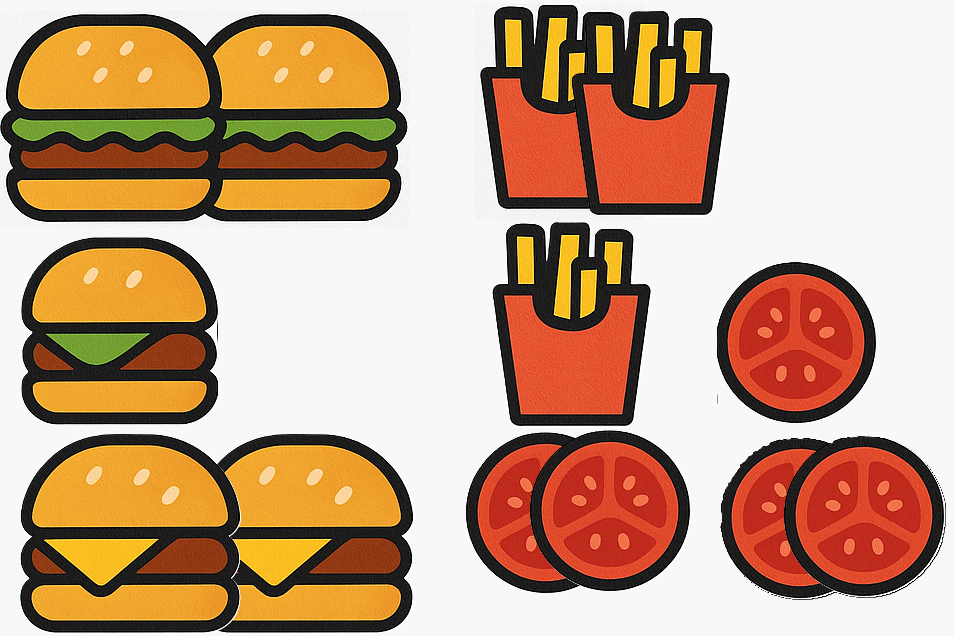
Here’s a sample order to illustrate quantity handling:
Order:
- 2 Hamburgers
- 1 Fries (one for each burger)
- 1 Hamburger
- 1 Fries
- 1 Extra Tomato
- 2 Cheeseburgers
- 2 Extra Tomato (2 tomatoes each)
UEAT Expected Behavior
The UEAT order model supports:
- Item-level quantity: Each item includes a
quantityfield. - Modifier-level quantity: Each modifier includes a
quantityfield when applicable.
Generic JSON Structure
{
  "orderItems": [
    {
      "itemId": 123,
      "description": "Hamburger",
      "quantity": 2,
      "modifiers": [
        {
          "modifierId": 678,
          "description": "Fries",
          "quantity": 1
        }
      ]
    },
    {
      "itemId": 123,
      "description": "Hamburger",
      "quantity": 1,
      "modifiers": [
        {
          "modifierId": 678,
          "description": "Fries",
          "quantity": 1
        },
        {
          "modifierId": 876,
          "description": "Tomato",
          "quantity": 1
        }
      ]
    },
    {
      "itemId": 345,
      "description": "Cheeseburger",
      "quantity": 2,
      "modifiers": [
        {
          "modifierId": 876,
          "description": "Tomato",
          "quantity": 2
        }
      ]
    }
  ]
}
Configuration Notes
- Ensure your POS system can interpret both item quantity and modifier quantity.
- If your POS does not support modifier quantities, repeat the modifier entry as needed.
- For kitchen display systems (KDS), UEAT does not manage the mechanism between the POS and the KDS.